2026
Role-Based Access Control in Milo
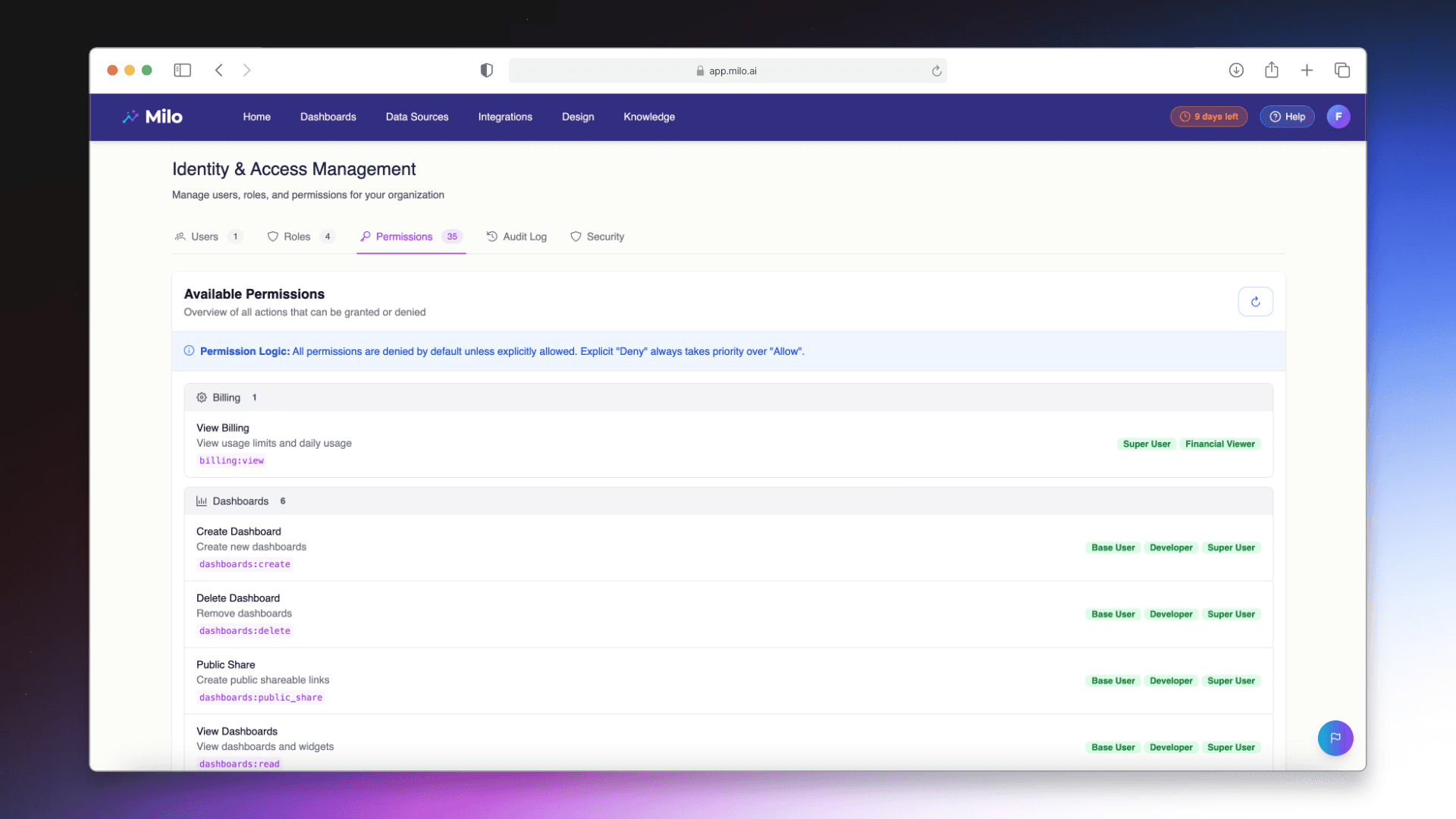
We’ve launched Role-Based Access Control (RBAC) in Milo - giving organizations a simple way to manage permissions across their workspace by role. You can now control who can see data, ask questions, manage sources, and change settings - while keeping collaboration fast and friction-free.

Faustas Rimkevičius
Growth Marketing
Introducing Role-Based Access Control in Milo: Secure Team Access Without Slowing Down Decisions
As more teams use Milo to answer everyday data questions, one need becomes clear very quickly: not everyone should have the same level of access.
Some users need full control. Others only need answers. Some should see sensitive datasets - others shouldn’t.
Until now, managing that balance required manual work and careful oversight. Today, that changes.
We’ve launched Role-Based Access Control (RBAC) in Milo - giving organizations a simple way to manage permissions across their workspace by role. You can now control who can see data, ask questions, manage sources, and change settings - while keeping collaboration fast and friction-free.
This is a major step forward for teams scaling Milo across departments and for organizations with governance and security requirements.
The Challenge: Self-Serve Analytics Needs Structure
Milo is designed to make analytics accessible. Anyone can ask questions and get answers in seconds. That speed is what makes teams productive - but as adoption grows, open access can become a risk.
Different roles inside a company need different capabilities:
Executives want high-level answers and summaries
Analysts need deeper exploration tools
Operators need limited, task-specific access
Admins manage data sources and workspace settings
Without structured access control, teams usually face a tradeoff:
Give broad access → increase data exposure risk
Restrict manually → slow down usage and rollout
Neither option scales well.
Role-Based Access Control removes that tradeoff by adding clear, manageable permission layers.
What RBAC in Milo Allows You to Control
RBAC lets workspace admins assign permissions based on responsibility - not guesswork.
With RBAC enabled, you can control who can:
View specific data sources
Ask questions across datasets
Create and share analyses
Manage integrations
Change workspace settings
Invite or manage users
Administer roles and permissions
Instead of one access level for everyone, you create structured roles that match how your team actually works.
Each user gets exactly what they need - nothing more, nothing less.
How RBAC Works in Real Teams
Role-based access isn’t just a security feature - it’s an operational tool. Here’s how teams commonly apply it inside Milo.
Executive View Access
Leadership teams often need answers, not raw tables.
With RBAC, executives can have:
Read-only access
Approved datasets only
Summary-level visibility
No configuration controls
They get insights quickly without risk of accidental changes or exposure to unnecessary detail.
Analyst and Power User Roles
Analysts typically need full exploration capability.
They can receive:
Full query access
Analysis creation tools
Sharing permissions
Broader dataset visibility
But without admin-level workspace controls.
Department-Based Access
As Milo expands across functions, data visibility can be segmented by team.
For example:
Finance sees revenue and cost data
Product sees usage and feature metrics
Marketing sees funnel and campaign data
Each team works independently while sensitive datasets remain restricted.
Why RBAC Is Critical for Scaling Milo
RBAC is often the feature that turns a successful pilot into a company-wide rollout.
Organizations expanding Milo across teams need:
Predictable permission structures
Data access boundaries
Reduced exposure risk
Governance support
Audit-friendly controls
RBAC enables all of this without adding process friction.
It also helps during:
Security reviews
Procurement approvals
IT governance checks
Compliance conversations
When access control is built in, expansion moves faster.
Designed for Admin Simplicity
Powerful permission systems often become complex to manage. RBAC in Milo is designed to avoid that.
Admins can:
Assign roles in minutes
Adjust permissions anytime
Update access as teams change
Apply structure without overhead
No scripting. No complicated rule trees. No heavy configuration layers.
It’s structured - but lightweight.
Invisible for End Users
Good access control should not slow users down - and in Milo, it doesn’t.
Users simply log in and see:
The data they’re allowed to access
The actions they’re allowed to perform
The tools they’re allowed to use
There are no extra steps, switches, or workflows. Permissions are enforced automatically in the background.
That means teams keep the speed of self-serve analytics while admins keep control.
Security and Speed Can Coexist
Analytics adoption often stalls when security requirements collide with usability. RBAC removes that tension.
With role-based access in place, teams can:
Expand usage safely
Share insights confidently
Protect sensitive data
Maintain governance standards
Keep decision speed high
Security no longer needs to be the reason rollout slows down.
Getting Started with RBAC in Milo
RBAC is now available in Milo workspaces.
To enable it:
Open workspace settings
Go to roles
Define your roles
Assign permissions
Map users to roles
If you’re unsure how to structure roles, our team can help you design a model based on your organization and data setup.
What This Unlocks Next
Role-based access is a foundational layer for broader enterprise capabilities. It enables deeper governance, safer collaboration, and more advanced workspace controls going forward.
Most importantly, it lets teams scale Milo with confidence - across more users, more departments, and more decisions.
Secure access. Clear roles. Faster answers.
RBAC is now live in Milo.
More insights to explore
Discover additional case studies, tips, and strategies to help your business grow and innovate faster.