//
//
New Improved UI
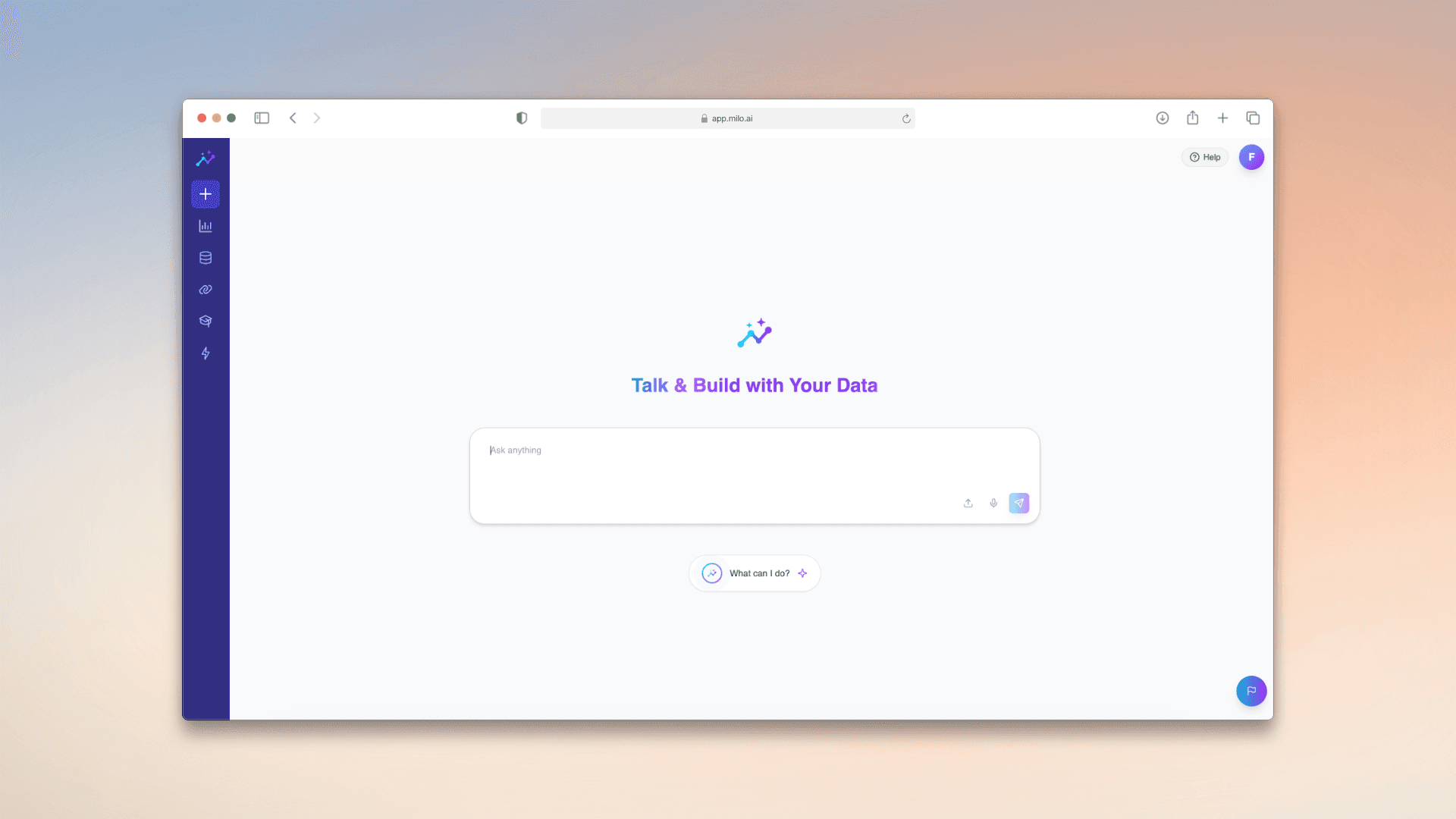
Designing a workspace that puts data first
As Milo continues to grow, so do the expectations of how it should feel to use every day.
We’ve spent time looking closely at how people move through the product - where friction appears, what takes up space, and what quietly gets in the way of focus. One thing became clear: the interface should do less, so your data can do more.
This update is a step in that direction.

Rethinking the workspace
The biggest change is structural. We’ve reworked how navigation fits into Milo to create a layout that feels more natural and less intrusive.
By shifting the balance of the interface, we’ve opened up more vertical space for dashboards, reports, and insights. Instead of competing with the UI, your data now has more room to be seen, explored, and understood.
At the same time, navigation becomes something that supports your workflow - always accessible, but never in the way.
A more fluid way to move
Beyond just layout, this update is about flow.
Moving between features should feel effortless. Whether you’re jumping between dashboards, checking reports, or exploring different parts of Milo, the experience is now faster and more predictable.
There’s less friction in switching contexts, and fewer moments where you have to stop and think about where to go next.
Less interface, more clarity
A big part of this redesign was removing unnecessary noise.
By simplifying the structure and creating clearer separation between navigation and content, the overall interface feels lighter and more focused. This improves readability across the board - especially in data-heavy views where clarity matters most.
It’s not about adding more. It’s about making space for what’s already there.
Built for how Milo is used
This change reflects how Milo is actually used day to day - as a tool for working with data continuously, not occasionally.
Longer sessions, deeper analysis, more complex dashboards - all of these benefit from a workspace that feels open, calm, and easy to navigate.
Looking ahead
This is a foundational update.
It sets the direction for a more flexible and scalable interface, where future improvements can build on a clearer, more consistent structure.
As always, we’ll keep refining Milo to better support the way you work with data.
2026
3 minutes
UI/UX
//
//
New Improved UI
Designing a workspace that puts data first
As Milo continues to grow, so do the expectations of how it should feel to use every day.
We’ve spent time looking closely at how people move through the product - where friction appears, what takes up space, and what quietly gets in the way of focus. One thing became clear: the interface should do less, so your data can do more.
This update is a step in that direction.
Rethinking the workspace
The biggest change is structural. We’ve reworked how navigation fits into Milo to create a layout that feels more natural and less intrusive.
By shifting the balance of the interface, we’ve opened up more vertical space for dashboards, reports, and insights. Instead of competing with the UI, your data now has more room to be seen, explored, and understood.
At the same time, navigation becomes something that supports your workflow - always accessible, but never in the way.
A more fluid way to move
Beyond just layout, this update is about flow.
Moving between features should feel effortless. Whether you’re jumping between dashboards, checking reports, or exploring different parts of Milo, the experience is now faster and more predictable.
There’s less friction in switching contexts, and fewer moments where you have to stop and think about where to go next.
Less interface, more clarity
A big part of this redesign was removing unnecessary noise.
By simplifying the structure and creating clearer separation between navigation and content, the overall interface feels lighter and more focused. This improves readability across the board - especially in data-heavy views where clarity matters most.
It’s not about adding more. It’s about making space for what’s already there.
Built for how Milo is used
This change reflects how Milo is actually used day to day - as a tool for working with data continuously, not occasionally.
Longer sessions, deeper analysis, more complex dashboards - all of these benefit from a workspace that feels open, calm, and easy to navigate.
Looking ahead
This is a foundational update.
It sets the direction for a more flexible and scalable interface, where future improvements can build on a clearer, more consistent structure.
As always, we’ll keep refining Milo to better support the way you work with data.
2026
3 minutes
UI/UX
//
New Improved UI
Designing a workspace that puts data first
As Milo continues to grow, so do the expectations of how it should feel to use every day.
We’ve spent time looking closely at how people move through the product - where friction appears, what takes up space, and what quietly gets in the way of focus. One thing became clear: the interface should do less, so your data can do more.
This update is a step in that direction.
Rethinking the workspace
The biggest change is structural. We’ve reworked how navigation fits into Milo to create a layout that feels more natural and less intrusive.
By shifting the balance of the interface, we’ve opened up more vertical space for dashboards, reports, and insights. Instead of competing with the UI, your data now has more room to be seen, explored, and understood.
At the same time, navigation becomes something that supports your workflow - always accessible, but never in the way.
A more fluid way to move
Beyond just layout, this update is about flow.
Moving between features should feel effortless. Whether you’re jumping between dashboards, checking reports, or exploring different parts of Milo, the experience is now faster and more predictable.
There’s less friction in switching contexts, and fewer moments where you have to stop and think about where to go next.
Less interface, more clarity
A big part of this redesign was removing unnecessary noise.
By simplifying the structure and creating clearer separation between navigation and content, the overall interface feels lighter and more focused. This improves readability across the board - especially in data-heavy views where clarity matters most.
It’s not about adding more. It’s about making space for what’s already there.
Built for how Milo is used
This change reflects how Milo is actually used day to day - as a tool for working with data continuously, not occasionally.
Longer sessions, deeper analysis, more complex dashboards - all of these benefit from a workspace that feels open, calm, and easy to navigate.
Looking ahead
This is a foundational update.
It sets the direction for a more flexible and scalable interface, where future improvements can build on a clearer, more consistent structure.
As always, we’ll keep refining Milo to better support the way you work with data.